
When you set up a Wear OS smartwatch, fitness and wellness tracking are usually at the top of your list of priorities. But unlike Apple Watch users who are tied directly to the Apple Fitness ecosystem, Wear OS owners have choices. The two most prominent native health platforms available on Google's smartwatch ecosystem are Samsung Health and Google Fit.
Both applications promise to track your daily steps, monitor your heart rate, log your gym workouts, and dissect your sleep cycles. However, they approach health tracking with different philosophies. Samsung Health is a comprehensive, feature-dense health hub, while Google Fit focuses on simplicity and gamified goals. In this article, we compare Samsung Health vs. Google Fit head-to-head to help you choose the best platform for your active lifestyle.
User Interface and Wrist Usability
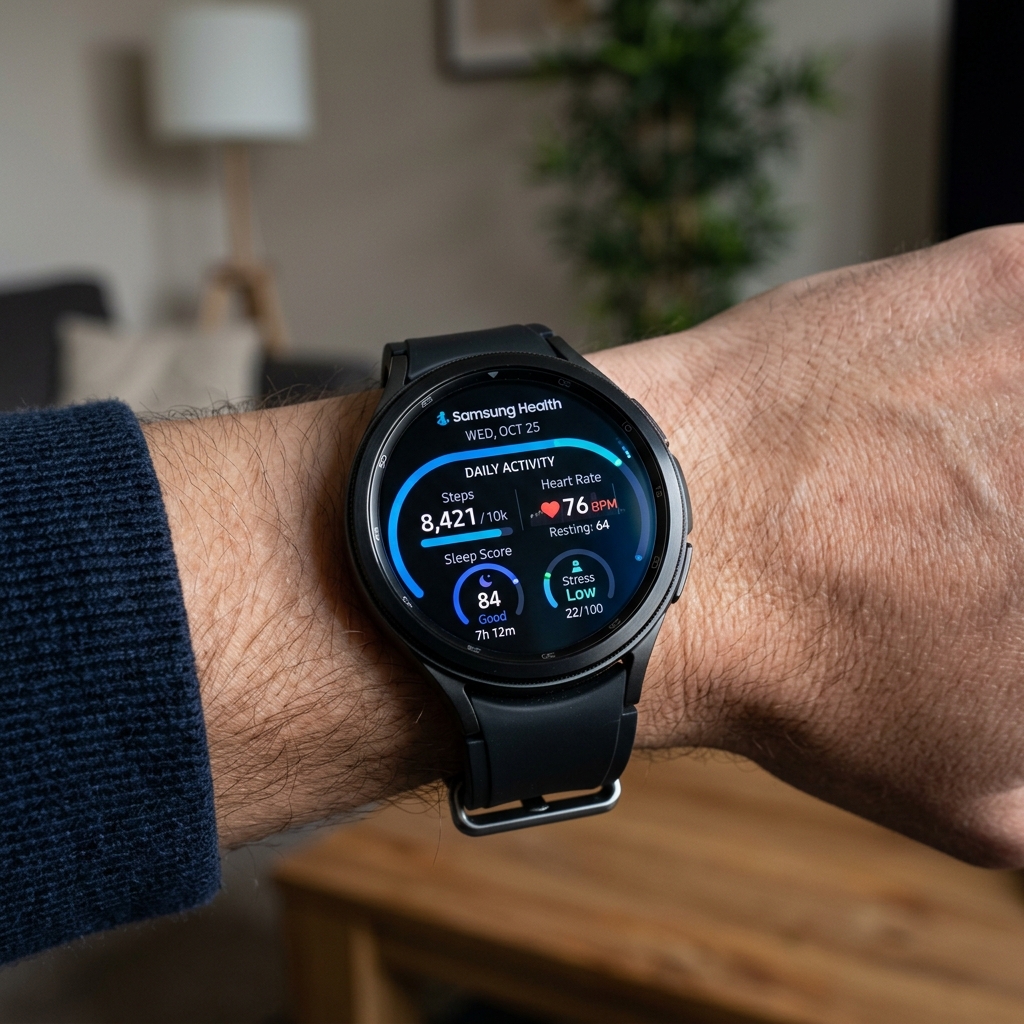
A good health app must be easy to navigate on a tiny watch display. Let's look at how both platforms display information on your wrist:
- Samsung Health: Optimized for circular watch screens (and particularly Samsung's rotating bezels). The interface features colorful icons, smooth scrolling animations, and highly customizable Tiles. You can quickly swipe to see your daily activity rings, log water intake, or measure stress levels.
- Google Fit: Designed with clean Google Material Design aesthetics. It centers around two main metrics: Heart Points and Steps. The watch tiles are minimalist, loading quickly and presenting clear, uncluttered text. It lacks some of the colorful flair of Samsung's app but is highly legible during fast workouts.
Workout Tracking and Accuracy
For tracking workouts, both platforms utilize your watch's GPS, heart rate sensor, and accelerometer. However, their automation and depth of information vary:
Samsung Health excels at automatic workout detection. If you walk, run, cycle, or use an elliptical for more than 10 minutes, the watch seamlessly registers the activity, logs the duration, and categorizes it without you tapping a single button. It also offers advanced running dynamics, such as asymmetry analysis, contact time, and flight time, which are highly valuable for serious runners.
Google Fit is much more basic. It supports a vast range of workout categories (from yoga to ultimate frisbee), but its automatic tracking is less reliable. The metrics shown during active workouts are straightforward: elapsed time, distance, heart rate, and calories burned. It does not provide the deep biomechanical analysis that Samsung offers.
Biometrics and Sleep Analysis
Modern smartwatches are worn 24/7 to record sleep and daily stress levels. Here, the difference in features becomes even more pronounced:
Samsung Health offers a massive catalog of wellness metrics. Beyond standard heart rate monitoring, it tracks body composition (Bioelectrical Impedance Analysis to calculate body fat percentage and skeletal muscle mass), stress, skin temperature changes overnight, and blood oxygen levels. Its sleep coaching program analyzes your sleep over weeks, assigning you a representative "Sleep Animal" and outlining tips to improve sleep hygiene.
Google Fit tracks basic heart rate, step count, and sleep duration. It relies heavily on third-party apps to feed sleep details into its database. It does not natively support advanced biometric metrics like body composition analysis or skin temperature trends, making it feel somewhat bare-bones in comparison.
Pro Tip: Android Health Connect
You do not have to choose just one. Android's built-in Health Connect platform acts as a secure, local bridge. You can allow Samsung Health to write your workouts and sleep data, and authorize Google Fit to read that data. This lets you utilize the advanced tracking of a Galaxy Watch while keeping Google Fit as your primary dashboard.
Comparison Table
Let's summarize how these two platforms stack up across key categories:
| Feature Parameter | Samsung Health | Google Fit |
|---|---|---|
| Daily Goal Concept | Activity Rings (Calories, Active Time, Activity) | Heart Points and Steps (AHA recommended) |
| Auto-Workout Detection | Excellent (detects walking, running, swimming, etc.) | Basic (often logs walking/running late or misses it) |
| Sleep Tracking Depth | Advanced (SpO2, Snore Recording, Sleep Animals) | Basic (stages and duration graphs only) |
| Advanced Sensors | BIA (Body Fat), Temperature, Stress, HRV | Heart rate only |
| Nutrition & Hydration | Built-in calorie counter, water, and caffeine logger | None (requires third-party sync) |
| Device Availability | Best on Samsung devices; limited on other brands | Universal across all Wear OS and Android devices |
Ecosystem and Sync Compatibility
Compatibility can be a deciding factor. If you own a Samsung Galaxy Watch, Samsung Health is deeply integrated into the watch system, allowing you to access all physical sensors. Using Google Fit on a Galaxy Watch requires downloading it separately from the Play Store, and it won't be able to access the BIA body fat sensor or the ECG monitor.
Conversely, if you own a Google Pixel Watch, Fossil, or Mobvoi TicWatch, Samsung Health is not pre-installed and has limited functionality. For non-Samsung Wear OS devices, Google Fit (or the Fitbit integration on newer Pixel Watches) is the logical, out-of-the-box solution.
Conclusion: Which One Should You Use?
If you own a Samsung Galaxy Watch and want deep, feature-rich analysis including body composition, water intake tracking, advanced running analytics, and personalized sleep coaching, Samsung Health is the clear winner.
If you prefer a clean, simple, gamified tracking experience that runs smoothly on any Wear OS watch brand without manufacturer locks, Google Fit is a solid, stress-free choice that keeps your fitness goals focused on active movement.